NudgeForMe: An AI Follow-Up Agent for Emails That Slip Through the Cracks
Email follow-ups are easy to underestimate. A message is sent, the day gets busy, and the conversation quietly disappears under newer emails. This can happen with sales leads, client questions, partnership discussions, hiring conversations, invoices, project updates, and many other everyday workflows.
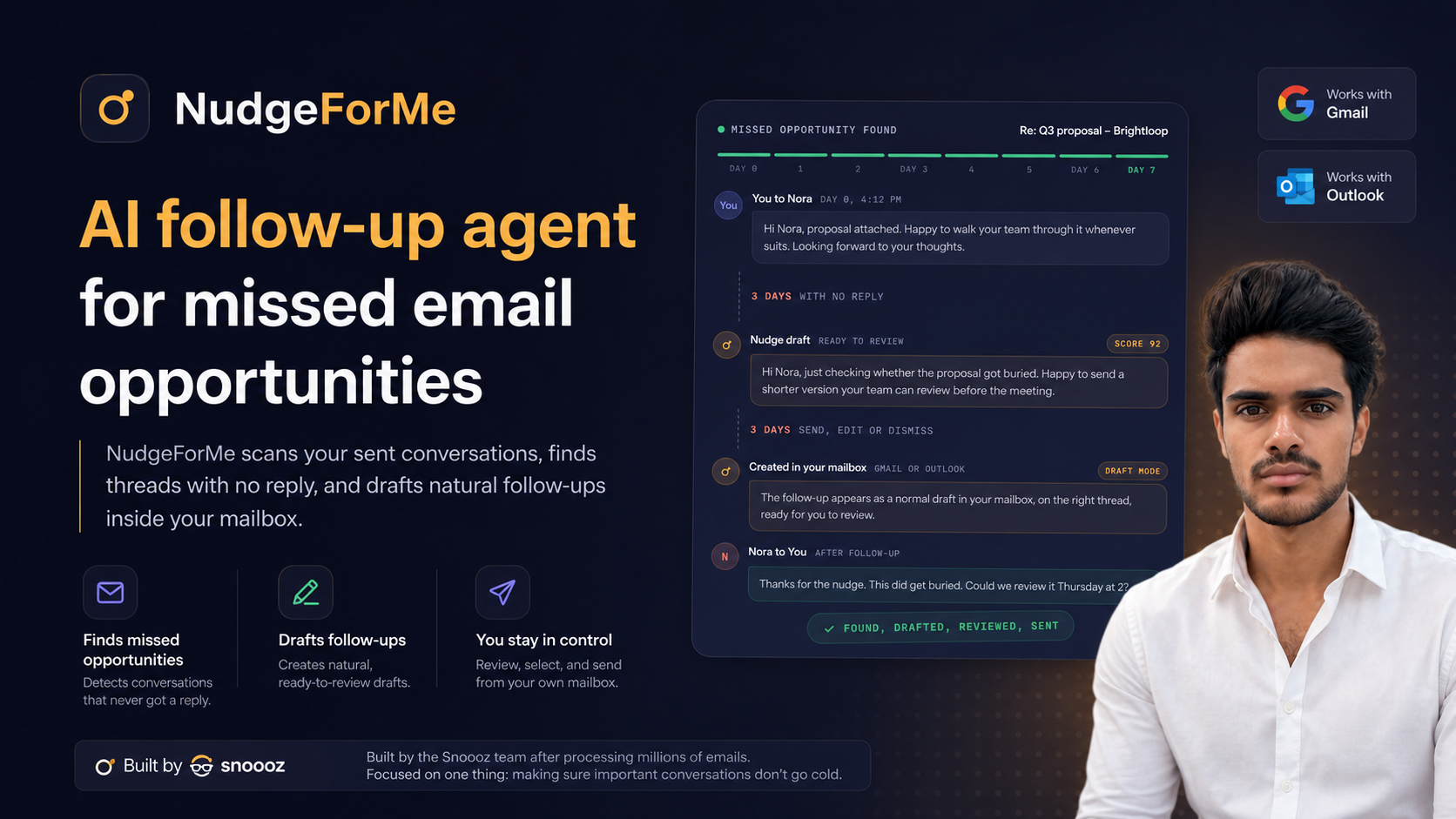
NudgeForMe is built around this specific problem. It is an AI follow-up agent that looks through sent email conversations, finds threads where the other person has not replied, and drafts follow-up messages inside the user’s own mailbox. The platform is designed to help people notice missed email opportunities before they go completely cold.
The website is available at https://nudgeforme.com.
What NudgeForMe Does
NudgeForMe focuses on one main workflow: finding sent emails that may need a follow-up. Instead of asking users to manually remember every unanswered thread, it scans sent conversations and identifies email exchanges where someone did not respond.
After identifying these opportunities, NudgeForMe drafts follow-up emails. These drafts are placed inside the user’s own mailbox, so the follow-up process stays close to the email tools people already use.
The platform starts in draft mode. This means it does not automatically send messages without the user’s review. The user can look through the follow-up opportunities, decide which ones are useful, edit the drafts if needed, and send them from their mailbox.
The Problem It Tries to Solve
Many people already know they should follow up more consistently, but the actual process can be difficult to maintain. A typical workday may include dozens of sent emails across different topics. Some need a reply within a day. Others can wait a week. Some are important, while others no longer matter after a certain point.
Without a system, follow-ups often depend on memory. People may use reminders, calendar events, CRM tasks, labels, spreadsheets, or email snooze features. These approaches can work, but they also require ongoing manual effort.
NudgeForMe approaches the issue from the sent-mail side. It looks for conversations that appear to have stopped after the user sent a message. This can help surface threads that may deserve attention, especially when the original email was related to an opportunity, deal, partnership, or customer conversation.
How It Fits Into Email Workflows
NudgeForMe works with common email setups, including Gmail, Outlook, and IMAP/SMTP. That makes the product relevant to people who use mainstream email services as well as those who connect through standard mail protocols.
The basic workflow looks like this:
- NudgeForMe scans sent conversations.
- It identifies threads where the recipient has not replied.
- It creates natural follow-up drafts inside the mailbox.
- The user reviews each suggested opportunity.
- The user chooses which drafts to send, edit, ignore, or delete.
This draft-first setup is important because follow-up emails often need context. A useful follow-up for a sales lead may look different from one for a customer support conversation or a partnership discussion. By keeping the user in control, NudgeForMe acts as a drafting and discovery layer rather than a fully automatic sender.
Why Draft Mode Matters
Automated email tools can create risk if they send messages too quickly or without enough context. A thread may not need a follow-up anymore. The recipient may have replied through another channel. The topic may have changed. In some cases, sending a reminder could be unnecessary or poorly timed.
NudgeForMe’s draft mode helps reduce that concern by keeping the final decision with the user. The tool can identify a missed reply and prepare a message, but the user can still review the conversation before anything goes out.
This is useful for professional communication because tone and timing matter. A short reminder may be appropriate in one case, while another thread may require a more detailed response or no response at all.
Who Might Find It Relevant
NudgeForMe is not positioned as a broad email productivity suite. It is focused on follow-ups. That makes it most relevant for people whose work depends on conversations continuing after an initial email has been sent.
Examples include:
- Sales teams and founders following up with leads or potential customers.
- Freelancers and consultants checking in on proposals, project discussions, or unpaid responses.
- Partnership and business development teams managing outreach conversations.
- Customer-facing teams making sure important client threads do not go quiet.
- Recruiters or hiring managers tracking candidates, referrals, or internal coordination.
- Professionals with high email volume who regularly send important messages and may not remember every open thread.
The common theme is not the job title. It is the need to notice when a sent message did not receive a response and decide whether a follow-up makes sense.
A Narrow Tool for a Common Email Gap
One interesting aspect of NudgeForMe is how narrow its focus is. Many productivity products try to cover inbox management, task lists, scheduling, reminders, writing assistance, and team collaboration at the same time. NudgeForMe is centered on one repeated problem: unanswered sent conversations.
This narrower scope can make the product easier to understand. It is not meant to replace an inbox, a CRM, or a project management tool. Instead, it works around a specific email behavior that many people deal with: sending something important and never getting a reply.
The product was built by the Snoooz team, which has worked with large volumes of email. NudgeForMe applies that email-focused background to the follow-up process, especially for situations where opportunities can fade simply because nobody returned to the thread.
Things to Consider Before Using It
Because NudgeForMe works with email, users should think carefully about how it fits into their own communication habits and privacy expectations. Any tool that scans conversations should be reviewed with attention to account access, permissions, and organizational policies.
It is also worth considering how follow-ups should be handled in different contexts. Not every unanswered message is an opportunity. Some conversations naturally end. Some recipients may need more time. Some follow-ups may require a personal note rather than a generic reminder.
For that reason, the review step is a key part of the workflow. The drafts can help save time, but the user still decides what is appropriate for each conversation.
Final Overview
NudgeForMe is a practical example of an AI tool built around a specific communication problem. It scans sent email conversations, finds threads where the other person has not replied, and creates follow-up drafts inside the user’s mailbox. It supports Gmail, Outlook, and IMAP/SMTP, and it begins in draft mode so users can stay in control before sending anything.
For people whose work depends on leads, deals, partnerships, customer conversations, or other email-based opportunities, the platform provides a way to surface conversations that might otherwise be forgotten. Its purpose is simple: help make sure important sent emails do not quietly go cold without being noticed.
More information is available at https://nudgeforme.com.