Chronicle: An AI-Assisted Platform for Building Better Presentations
Creating a presentation often starts with scattered notes, unfinished ideas, copied text, and a blank slide deck that somehow needs to become clear, structured, and visually presentable. For many people, the hardest part is not only writing the content, but also shaping it into a story that makes sense to an audience.
Chronicle: Cursor for Slides is a platform built around that problem. It combines AI-assisted creation with presentation templates and collaboration features to help users move from raw thoughts to more polished presentations. The platform is positioned for serious work, which means it is aimed at people who need to communicate ideas clearly in professional settings, not just create decorative slides.
The platform can be found at https://chroniclehq.com.
What Is Chronicle?
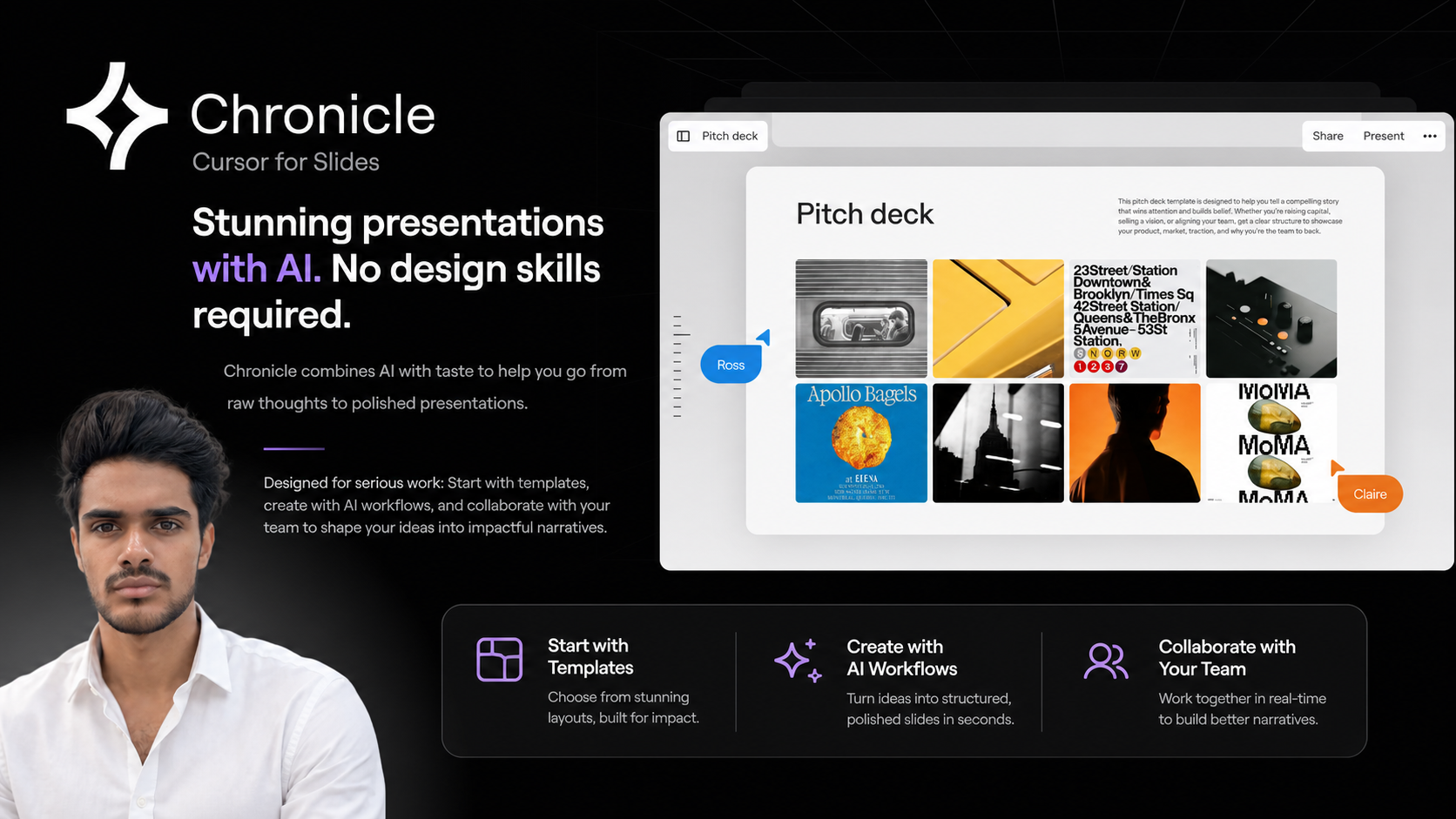
Chronicle is an AI-powered presentation platform. Its tagline, “Stunning presentations with AI. No design skills required,” gives a simple idea of what it is trying to do: reduce the effort involved in turning ideas into well-structured presentations.
Instead of beginning with a completely empty slide, Chronicle provides a more guided environment. Users can start with templates, use AI workflows to generate or shape content, and work with others to refine the final presentation. The focus is not only on slide design, but also on helping ideas become more coherent and easier to present.
The phrase “Cursor for Slides” suggests a tool that brings an AI-assisted creation experience to presentation work. In practical terms, this means Chronicle is designed to support the process of creating, editing, and improving slide-based narratives with the help of AI.
The Problem It Tries to Solve
Presentations are common in almost every professional environment. Teams use them for planning, pitching, reporting, training, strategy discussions, product updates, and internal communication. Even outside work, presentations are useful for education, events, workshops, and personal projects.
However, building a presentation can be time-consuming because it involves several different tasks at once:
- Clarifying the main message
- Organizing information into a logical sequence
- Writing concise slide content
- Choosing a suitable layout
- Making the design look consistent
- Collaborating with others and collecting feedback
- Preparing a narrative that feels easy to follow
Many people are comfortable with their subject matter but less confident with slide design. Others may have strong ideas but struggle to translate them into a presentation structure. Chronicle is designed to make this process more manageable by combining templates, AI workflows, and collaboration in one place.
Starting with Templates
One of Chronicle’s key elements is the ability to start with templates. Templates are useful because they give structure before the content is fully developed. Instead of deciding every layout from scratch, users can begin with a format that already has a clear visual direction.
This can be helpful when preparing a presentation under time pressure or when consistency matters. Templates can also make the creation process less intimidating, especially for users who do not have design experience.
For professional work, templates can support common presentation needs such as explaining a concept, introducing a project, outlining a plan, or summarizing key points. The benefit is not simply visual polish, but also a starting framework that helps the user think through the flow of information.
Using AI Workflows to Shape Ideas
Chronicle also includes AI workflows. While the exact workflow will depend on how a user approaches the platform, the main purpose is to help transform rough material into presentation-ready content.
Raw ideas often come in many forms: meeting notes, bullet points, loose thoughts, research fragments, or a short brief. AI can help organize these inputs, suggest structure, and support the writing process. This does not remove the need for human judgment, but it can reduce the amount of manual work involved in getting from an early draft to a more coherent presentation.
AI-assisted workflows can be especially useful when the user knows what they want to say but has not yet decided how to say it. A presentation is not just a document split into slides. It needs pacing, emphasis, and a clear order. Chronicle’s focus on turning thoughts into impactful narratives suggests that it treats presentations as stories, not only as collections of slides.
Collaboration for Team-Based Work
Chronicle is also designed for team collaboration. This matters because many important presentations are not created by one person alone. A team may need to contribute ideas, review sections, adjust wording, refine messaging, or align the presentation with a broader goal.
Collaboration can help improve the final result, but it can also create confusion if the process is scattered across separate documents, messages, and slide files. A platform that supports collaborative presentation building can make it easier for teams to shape ideas together in a shared space.
For teams, Chronicle’s collaboration angle is relevant in situations such as:
- Preparing internal updates
- Building client or stakeholder presentations
- Developing strategy narratives
- Creating product or project explainers
- Turning team notes into a structured deck
- Refining messaging before an important meeting
The platform’s description emphasizes shaping ideas into impactful narratives, which is especially important when multiple people are involved. Collaboration is not only about editing slides; it is also about agreeing on the story the presentation should tell.
No Design Skills Required
A major part of Chronicle’s positioning is that users do not need design skills to create polished presentations. This is an important point because presentation quality is often judged not only by the content, but also by how clearly and cleanly that content is presented.
Design skills can take years to develop, and not everyone has time to learn layout, spacing, typography, hierarchy, and visual balance. Tools that provide structure and design guidance can help reduce that barrier.
In this context, Chronicle appears to focus on helping users create presentations that look more refined without requiring them to manually design every element. This can be useful for people who need to communicate ideas professionally but do not want to spend most of their time adjusting slide formatting.
Who Might Find Chronicle Useful?
Chronicle can be relevant to a wide range of people who regularly turn ideas into presentations. Since it is designed for serious work, it may be especially useful in professional and team environments.
Potential users may include:
- Founders and operators who need to explain strategies, updates, or plans
- Product teams preparing roadmaps, launches, or internal narratives
- Marketing teams shaping campaign ideas or reports into presentations
- Consultants building structured decks for clients or internal work
- Managers preparing business reviews, team updates, or planning documents
- Educators and trainers turning lessons or workshop material into slides
- Students and professionals who want to present ideas clearly without focusing heavily on design
The platform is not limited to one specific industry based on its description. Its core value is tied to the general process of building presentations from ideas, which is a common need across many fields.
How Chronicle Fits Into the Presentation Workflow
A typical presentation workflow usually begins with an idea or requirement. From there, the creator gathers material, outlines the structure, writes slide content, designs the deck, reviews it, and makes changes. Chronicle appears to bring several parts of that workflow into one environment.
A user might begin with a rough concept, choose a template, use AI to help develop the structure, add or refine content, and collaborate with teammates before finalizing the presentation. The goal is to make the process less fragmented and more focused on the message.
This can be particularly helpful when the presentation is not just a visual asset, but a communication tool. A good presentation should help the audience understand what matters, why it matters, and what should happen next. Chronicle’s focus on narratives suggests that it is built with this kind of communication in mind.
Things to Keep in Mind
Like any AI-assisted tool, Chronicle is best understood as a support system rather than a replacement for clear thinking. AI can help organize, draft, and refine content, but the user still needs to provide context, check accuracy, and make decisions about the final message.
It is also important to remember that presentation quality depends on more than visuals. A clean design helps, but the content still needs to be relevant, accurate, and appropriate for the audience. Chronicle can help with the creation process, but the strength of the final presentation will still depend on the ideas behind it.
Final Overview
Chronicle is an AI-assisted presentation platform that helps users move from rough ideas to polished slide-based narratives. It combines templates, AI workflows, and collaboration features, with a focus on professional presentation work and ease of use for people without design skills.
For anyone exploring modern tools for creating presentations, Chronicle is worth understanding because it reflects a broader shift in how slide decks are being made. Instead of treating presentation software as a blank canvas, it brings more structure, assistance, and team collaboration into the process.
You can learn more about the platform here: https://chroniclehq.com.