TouchGrass: A Context-Aware Break Reminder for macOS
Break reminders are simple in theory: after a certain amount of time, they remind you to step away, blink, stretch, or reset your posture. In practice, they can be awkward. A reminder that appears during a meeting, while recording the screen, or in the middle of watching something important can feel more disruptive than helpful.
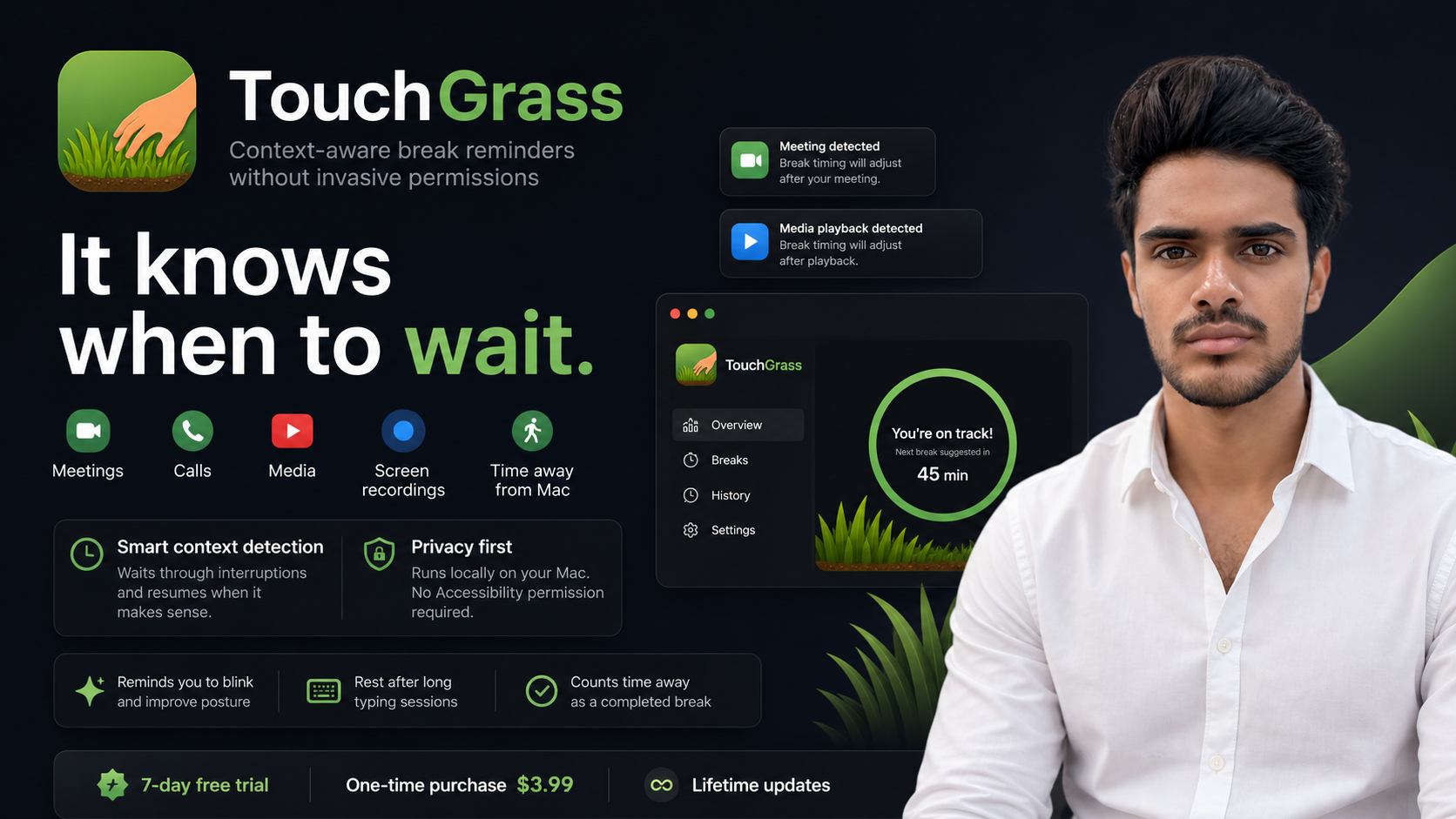
TouchGrass is a break reminder built for macOS that tries to handle this problem with more context. Instead of only watching the clock, it takes into account what is happening on the Mac before deciding when to nudge the user. It is designed to wait through meetings, calls, media playback, and screen recordings, and it also treats time spent away from the Mac as a completed break.
The platform is available at https://touchgrass.land.
What TouchGrass Is
TouchGrass is a lightweight macOS app focused on healthier computer habits. Its main purpose is to remind people to take breaks in a way that fits better into a normal workday. It is not positioned as a large productivity suite, a task manager, or a wellness platform with many separate modules. Its focus is narrower: break reminders that understand context.
The app is built around a common issue with timer-based break tools. Many of them count time continuously and show a reminder when the timer runs out, even if the person is currently on a video call, presenting, recording the screen, or watching media. TouchGrass is designed to avoid interrupting those moments.
Why Context Matters for Break Reminders
A standard break timer usually has one main signal: time. If the timer is set for 30 minutes, it triggers after 30 minutes. That can work in simple situations, but modern work on a Mac often includes calls, shared screens, long writing sessions, video playback, and periods of stepping away from the desk.
When a break reminder ignores those situations, it can create small but repeated interruptions. For example, a reminder during a meeting might not be useful if the user cannot act on it right away. A reminder during a screen recording may appear in the recording itself. A reminder after the user has already been away from the Mac may be unnecessary because the break already happened.
TouchGrass addresses this by making break timing more aware of what is happening. The goal is not simply to remind more often, but to remind at a moment when the reminder is more likely to make sense.
Key Features
TouchGrass includes several features centered on practical break habits and workflow awareness.
- Context-aware break timing: The app waits through meetings, calls, media playback, and screen recordings instead of interrupting those moments.
- Time away counts as a break: If the user leaves the Mac, that time can count as a completed break rather than triggering another reminder immediately after returning.
- Blink reminders: TouchGrass can remind users to blink, which is useful during long sessions of focused screen use.
- Posture reminders: The app can nudge users to improve posture while working at the Mac.
- Typing-session rest reminders: After long typing sessions, TouchGrass can remind users to rest.
- Local operation: Everything runs locally on the Mac.
- No Accessibility permission: TouchGrass does not ask for macOS Accessibility permission.
No Accessibility Permission Requirement
One detail that stands out is that TouchGrass never asks for Accessibility permission. On macOS, Accessibility permission can allow apps to observe or control parts of user interaction depending on what the app does. Some productivity and automation tools require it, but many users are cautious about granting it unless clearly necessary.
TouchGrass is designed to work without that permission. For people who pay attention to app permissions, this is an important part of understanding how the tool is structured. The app also runs locally, meaning its break reminder behavior is handled on the device rather than depending on a remote service.
How It Fits Into a Workday
The most useful way to understand TouchGrass is to imagine a typical day on a Mac. A person may start with email, then join a call, then write for an hour, then watch a training video, then step away for lunch, then return for more focused work. A basic timer treats most of that time in the same way. TouchGrass is designed to treat those situations differently.
If a meeting or call is happening, the app can wait instead of interrupting. If media is playing, it can avoid showing a reminder at the wrong time. If a screen recording is active, it can hold off so the reminder does not appear in the recording. If the person has already left the Mac, TouchGrass can recognize that the away time served as a break.
This approach is especially relevant for people whose workday does not follow a predictable pattern. Break habits are easier to maintain when reminders do not conflict with meetings, presentations, recordings, or other focused tasks.
Health Habits It Focuses On
TouchGrass does not only remind users to step away. It also includes reminders tied to common issues that happen during extended computer use.
Blinking
During focused screen work, people often blink less frequently. A blink reminder is a small prompt intended to reduce the tendency to stare continuously at the screen for long stretches.
Posture
Posture can gradually change during work, especially during long sessions at a desk. TouchGrass includes posture reminders that encourage users to reset how they are sitting or standing.
Rest After Typing
Long typing sessions can be physically demanding, especially when they happen without pauses. TouchGrass can remind users to rest after extended typing activity, helping break up continuous keyboard use.
Pricing and Trial
TouchGrass offers a 7-day free trial. After the trial, it is available as a one-time purchase of $3.99. The purchase includes lifetime updates.
This pricing structure is straightforward. It is not described as a recurring subscription. Users can try the app for a week and then decide whether to make the one-time purchase.
Who Might Want to Learn About It
TouchGrass is relevant to Mac users who spend long periods at the computer and want break reminders that are less likely to appear at inconvenient times. It may be of interest to people who regularly deal with:
- Video meetings and calls
- Screen recordings or presentations
- Long writing or coding sessions
- Extended typing work
- Media playback during work or learning
- Frequent stepping away from the Mac during the day
It is also relevant for users who prefer tools that run locally and avoid requesting broad system permissions such as Accessibility access.
A Small Tool With a Specific Purpose
TouchGrass is not trying to replace broader productivity systems or wellness programs. Its purpose is specific: provide break reminders on macOS while being aware of the user’s context. That makes the app easier to understand. It focuses on the moments when traditional break reminders often feel poorly timed and tries to make those reminders fit more naturally around real computer use.
For anyone exploring simple tools for healthier Mac habits, TouchGrass is one platform to be aware of. Its main ideas are context-aware timing, local operation, no Accessibility permission, and reminders for breaks, blinking, posture, and rest after long typing sessions.
You can find the platform here: https://touchgrass.land.